1vote

How do I use rollups to pull in filtered data (e.g. total expenses for current month)? Finance/Budgeting Related.

I am creating a Finance section in my Notion.

My current set up is I have a database for Expenses, and for Income, as well as Categories (type of expense), and Accounts (different bank/savings accounts).

On a Dashboard area, I want to be able to be able to have a few different things, which I believe revolve around a Rollup property but I can't figure out how to do it right.

The main things I want to be able to achieve are;
1) On the accounts table, be able to see how much I've spent in the current month, so an example could be
| Name [Main Bank Account] | Balance [£2000] | Monthly Spend [£500] |
The monthly spend would be somehow pulling in the Expenses and then Summing to get a total, but only for the current month.

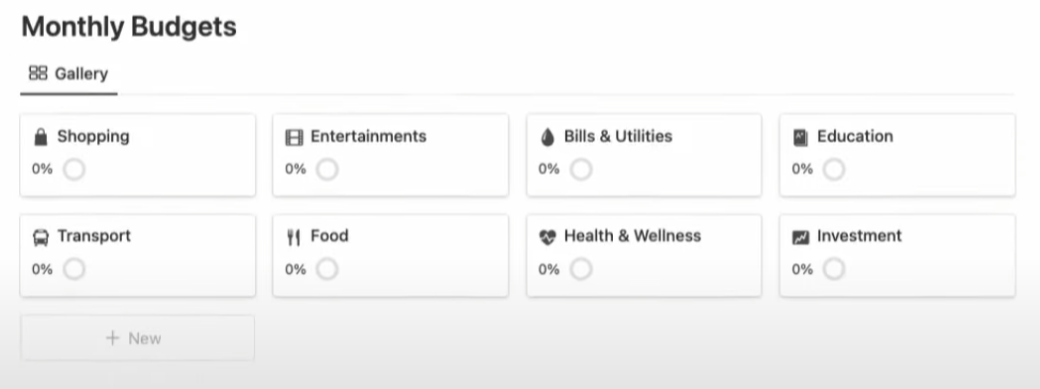
2) I want to set a monthly budget for each category, for example, | Groceries [£200] | and then using the data from my expense table, where I have tagged each expense with a category, in this case it would need to pull all the expenses that have the groceries category, Sum them to get a total, but only for the current month. Then I'd essentially want a progress bar or something similar which uses a Formula of Monthly Budget - Monthly Expense. I think I'd know how to do the formula part but just not how to get the information.

3) Is there a way to set a Date filter to the current month, without manually selecting a range? I can only see within the past month, but that seems to pull in the last 30 or so days rather than everything in January. I might be wrong here but when I tried it it pulled in a December expense.

I'll attach some images of where I have seen this done to try and give a bit of context to what I mean!
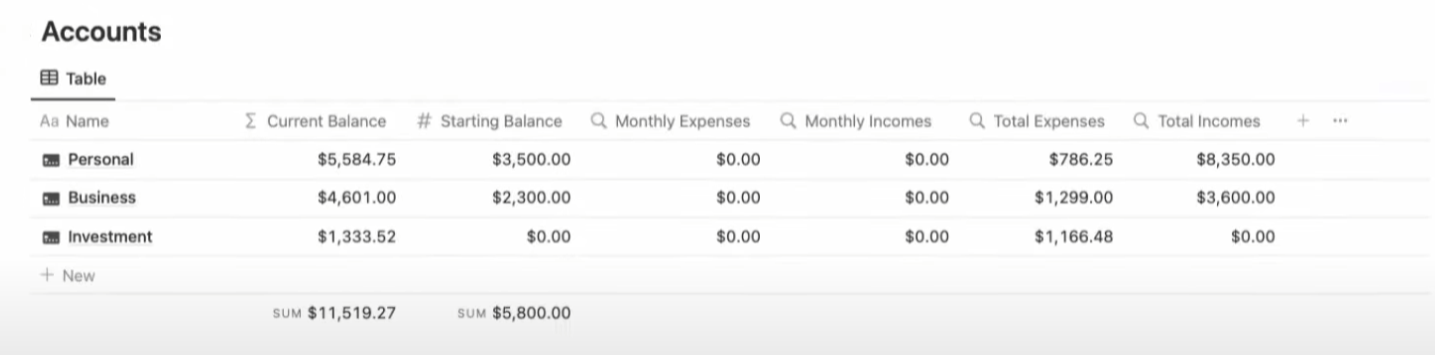
Accounts showing Monthly Expenses being pulled in

Budget Tracker showing monthly expenses against monthly budget for a category

I'd massively appreciate any help on this as it's driving me absolutely insane that I can't figure out how to do it but I've seen that it's possible!!

Thanks in advance x

2 Answers

1vote

See if my video here can help. Start at the timestamp of 2:25 and that starts the section on the Budget setup (similar to the Envelope method) and see if this will get you in the right direction. https://youtu.be/1Ao01qC1VZQ?t=145

The video is on speed build, so you may need to mute the video and slow it down.

0vote

commented Jan 17, 2023

Can't say I'm too sure what's going on in the video or it's hard to follow to try and pick out what I need in the context. Appreciate the help though. Is it clear what I'm trying to achieve? Do you need to do it in a hacky type of way? Or is it formula related?

0vote

freelancerops Points460

Rollups can't filter by date on their own, so the standard fix is to put the "this month" logic in a formula on the Expenses database and roll up that. Steps:

1. Add a helper property on Expenses
Create a formula property called This Month? (adjust Date to your date property name):

formatDate(prop("Date"), "YYYY-MM") == formatDate(now(), "YYYY-MM")

This returns true only for expenses dated in the current calendar month (so a December expense won't show up in January). It updates itself when the month changes. This also answers your question 3: Notion's built-in "Past month" filter means the last 30 days, which is why December leaked in. A formula checkbox is the way to get a true calendar month.

2. Monthly spend per account

  • Make sure Expenses has a relation to Accounts (it will create a reverse relation on Accounts).
  • On Accounts add a Rollup: Relation = Expenses, Property = This Month?... that only counts checkboxes, so instead add a second formula on Expenses called Month Amount:
if(prop("This Month?"), prop("Amount"), 0)
  • Now on Accounts add a Rollup: Relation = Expenses, Property = Month Amount, Calculate = Sum. Call it Monthly Spend.

3. Monthly budget per category

  • Same idea on Categories: relate Expenses to Categories, add a Rollup of Month Amount with Sum, called Spent This Month.
  • Add a Number property Monthly Budget (e.g. 200 for Groceries).
  • Add a formula Remaining:
prop("Monthly Budget") - prop("Spent This Month")
  • For a progress bar, add another formula Used:
prop("Spent This Month") / prop("Monthly Budget")

Then set that property's Number format to "Percent" with "Bar" display (Number format > Show as > Bar). Or use slice("▓▓▓▓▓▓▓▓▓▓", 0, round(prop("Used") * 10)) + slice("░░░░░░░░░░", 0, 10 - round(prop("Used") * 10)) for a text bar (cap Used at 1 with min() if you overspend).

4. Dashboard
Put linked views of Accounts and Categories on your Dashboard page (type /linked view of database), show Monthly Spend, Monthly Budget, Remaining and Used, and optionally sort by Used descending so overspent categories rise to the top.

Tip: if your Expenses are one-way tagged by category and account via select properties instead of relations, convert them to relations first, because rollups only work through relations.

If it helps, I made a free starter template with this setup: https://2rds.github.io/freelancer-ops/lite.html?ref=notionanswers

Please log in or register to answer this question.

...

Welcome to Notion Answers, where you can ask questions and receive answers from other members of the community.

Please share to grow the Notion Community!

Connect